
 Add-ons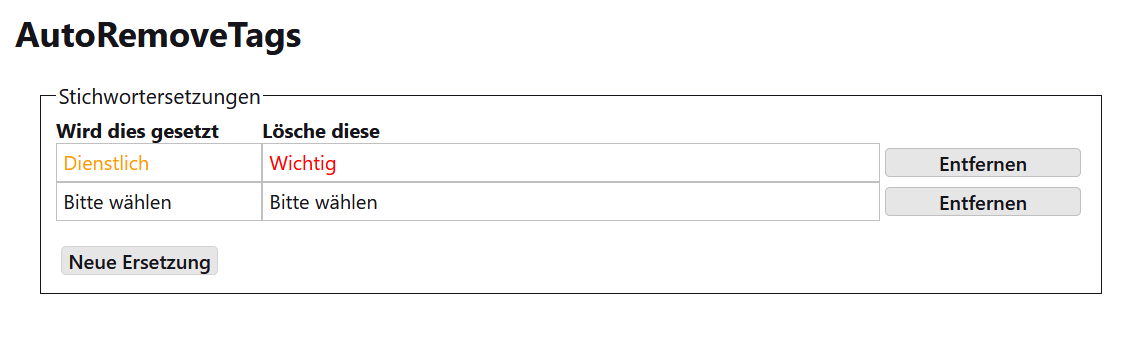
Wenn ein Stichwort gesetzt wird lösche andere Stichworte |
If a tag is set remove other tags |
|
Dieses Add-on erlaubt es, einzelne Stichworte zu löschen, wenn ein bestimmtes Stichwort gesetzt wird. Dies kann in den Einstellungen des Add-on festgelegt werden. |
This add-on allows to remove individual tags when a specific tag is set. This can be set in the settings of the add-on. |
|
Neueste Version herunterladen
Die Datei speichern. Dann in Thunderbird zu 'Extras' > 'Add-ons und Themes'
gehen, das Zahnradsymbol klicken und 'Add-on aus Datei installieren' auswählen.
|
Download the latest version
Save the file. Then, in Thunderbird, go to 'Tools' > 'Add-ons and Themes',
click the gear icon, and select 'Install Add-on From File'.
|
Versionen |
Versions |
| Date | Version | |
|---|---|---|
| 15.7.2026 | 1.1 |
|
| 4.12.2025 | 1.0 |
|
| 25.02.2025 | 0.5 |
|
| 28.12.2024 | 0.4 |
|
| 16.12.2024 | 0.3 |
|
| 11.12.2024 | 0.2 |
|
| 10.12.2024 | 0.1 |
|
15. Juli 2026, G.Gersdorf